
Resources - Blog
JSON integration made easier: simplify your MessageDefinitions with Babelway JSON V2
By Diego Mersch
April 28, 2026
Read time:5 MINUTES
JSON is at the core of modern API and ERP integrations
JSON is everywhere. From API communication to ERP integrations, it has become the standard format for exchanging structured data.
Yet, as integrations grow, JSON structures can quickly become difficult to read and maintain.
With JSON V2, Babelway introduces a cleaner and smarter way to handle JSON MessageDefinitions, making integrations easier to build, maintain, and scale.
👉 Experience Babelway JSON integration with a free trial. Start your trial here.
What’s new: JSON V2
We’ve introduced a revamped version of our JSON support to make your experience smoother and more efficient.
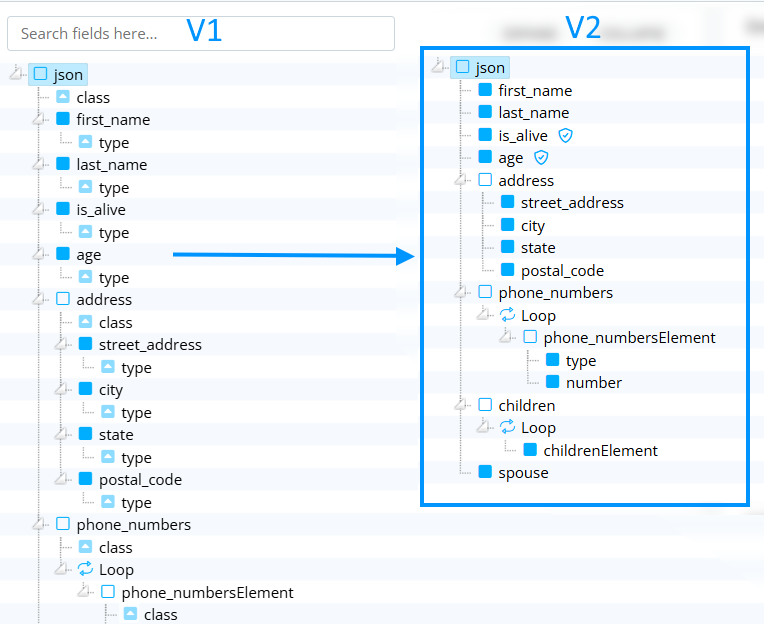
The biggest change lies in the MessageDefinition tree. Previously, JSON structures could become quite complex to read and maintain. With JSON V2, the tree is now cleaner, easier to understand, and much more intuitive to manipulate.
In practice, this means you spend less time trying to understand the structure, and more time focusing on building and maintaining your integrations.
A quick reminder: what is JSON?
JSON, or JavaScript Object Notation, is a lightweight, text-based format used to exchange structured data between systems. It is widely used across web applications, APIs, and integration platforms.
Here is a simple example of a JSON structure:
{
    "first_name": "John",
    "last_name": "Smith",
    "is_alive": true,
    "age": 27,
    "address": {
        "street_address": "21 2nd Street",
        "city": "New York",
        "state": "NY",
        "postal_code": "10021-3100"
    },
    "phone_numbers": [
        { "type": "home", "number": "212 555-1234" },
        { "type": "office", "number": "646 555-4567" }
    ],
    "children": [ "Catherine", "Thomas", "Trevor"],
    "spouse": null
}
JSON supports three main primitive data types: strings, numbers, and booleans. It also allows nested objects and arrays, which makes it extremely flexible for representing complex data structures.
Automatic MessageDefinition generation
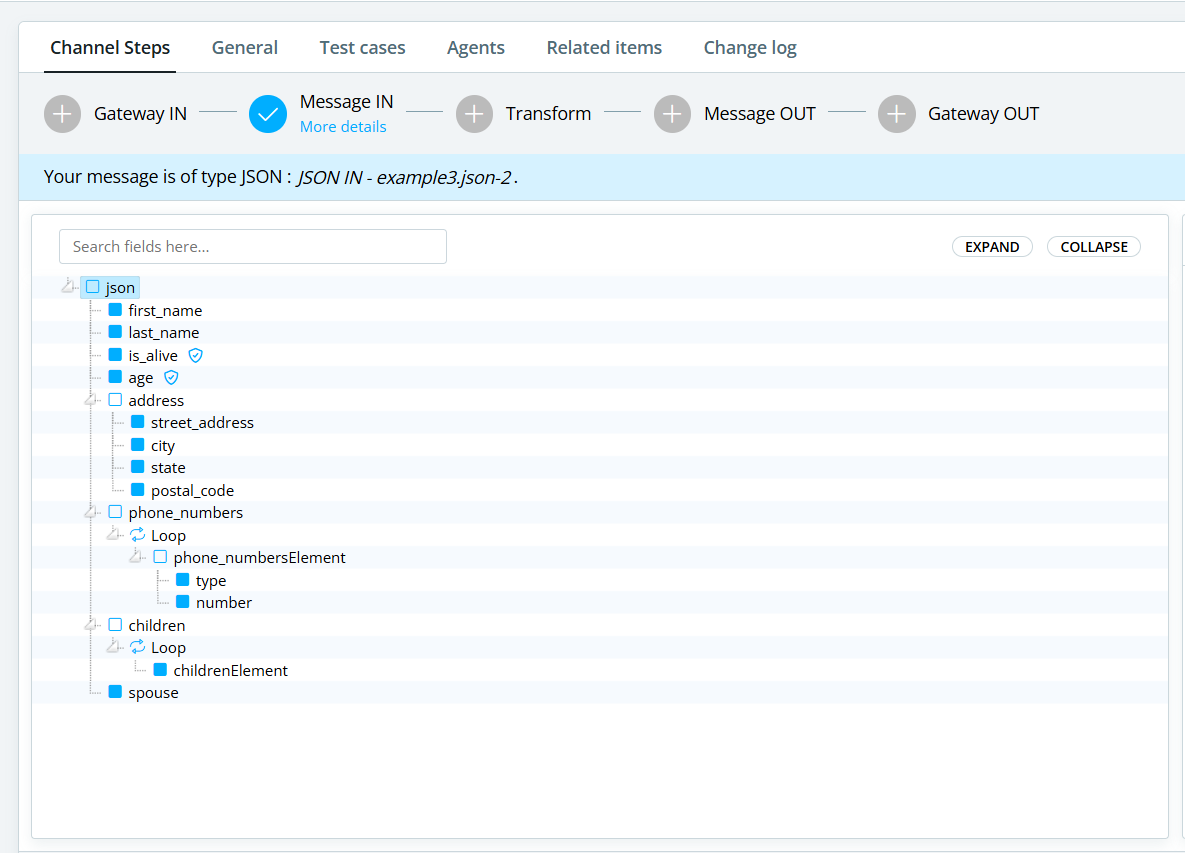
Creating a JSON MessageDefinition in Babelway remains extremely simple. You just need to select JSON as your format and provide a sample file.
From there, Babelway automatically generates the full structure of your message. You can then refine it by adding or removing fields, applying validations, or adapting the structure to match your exact requirements.
This approach removes the need to manually build complex structures and significantly speeds up the setup phase.
Smarter data typing
One important aspect when working with JSON is data typing.
In JSON, formatting depends directly on the type of data. Strings must be enclosed in quotes, while numbers and booleans must not.
Babelway uses the validation rules you define on each field to determine the correct output type. This ensures that the generated JSON is always properly formatted and reduces the risk of downstream errors.
Arrays vs Objects: handled automatically
Another key improvement is how Babelway interprets structures.
When elements follow a specific pattern, they are automatically treated as arrays. In all other cases, they are handled as standard objects.
This logic keeps the structure consistent and removes ambiguity when generating JSON outputs, especially in more complex mappings.
Migrating from JSON V1 to V2
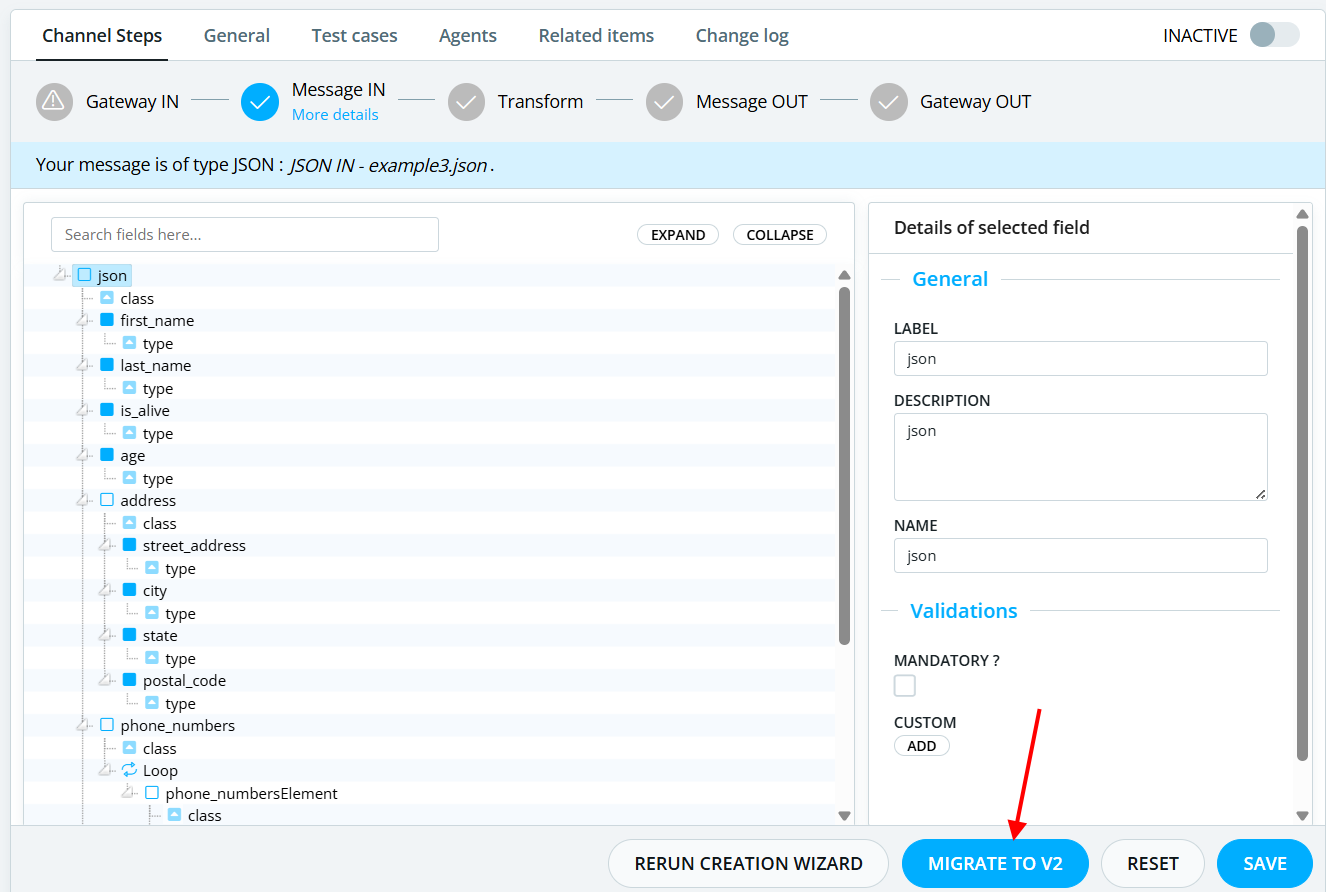
To simplify the transition, we have added a “Migrate to V2” button that automatically converts your existing definitions to the new format.
While JSON V2 simplifies the experience, a few underlying rules are important to understand. For example, Babelway identifies arrays based on a specific structure pattern (X / XElement naming). This behavior ensures consistency when generating output JSON.
You can also verify whether a MessageDefinition is using the new version by checking its version property, which should be set to “2”.
Finally, during migration, everything is preserved, including mappings, validations, node identifiers, and structure changes. Only legacy attributes such as “class” and “type” are removed, unless they were used in custom formulas.
Good news: migration is easy
To simplify the transition, we have added a “Migrate to V2” button that automatically converts your existing definitions to the new format.
The migration process has been designed to be fully safe. Everything you have built is preserved, including your structure changes, node names, validations, and existing mappings.
The only change is the removal of the technical “class” and “type” attributes, which are no longer needed in V2.
Edge cases and why you should move to JSON V2
In some situations, conflicting information may be detected during migration. For example, a field could be validated as an integer while being defined as a boolean in the legacy attributes.
In such cases, the system will detect the issue, block the migration, and ask you to correct the inconsistency before proceeding. This ensures that no incorrect data is introduced into your integrations.
JSON V2 is not just a technical improvement. It is a real quality-of-life upgrade for anyone working with MessageDefinitions. It provides cleaner structures, better readability, easier maintenance, and more reliable outputs.
If you are still using V1, moving to V2 will make your day-to-day work significantly smoother.
This update is all about simplifying complexity. Less technical noise, more clarity, and more control over your data flows. Exactly what you need when working on modern integration projects.
Book a demo or start your 30 day trial to discover how Babelway simplifies JSON integration and data transformation.
Babelway handles any-to-any document transformation
See more of this topic
About the author
